Building a Local Production-Ready GitOps Architecture with k3d, ArgoCD, and Kustomize
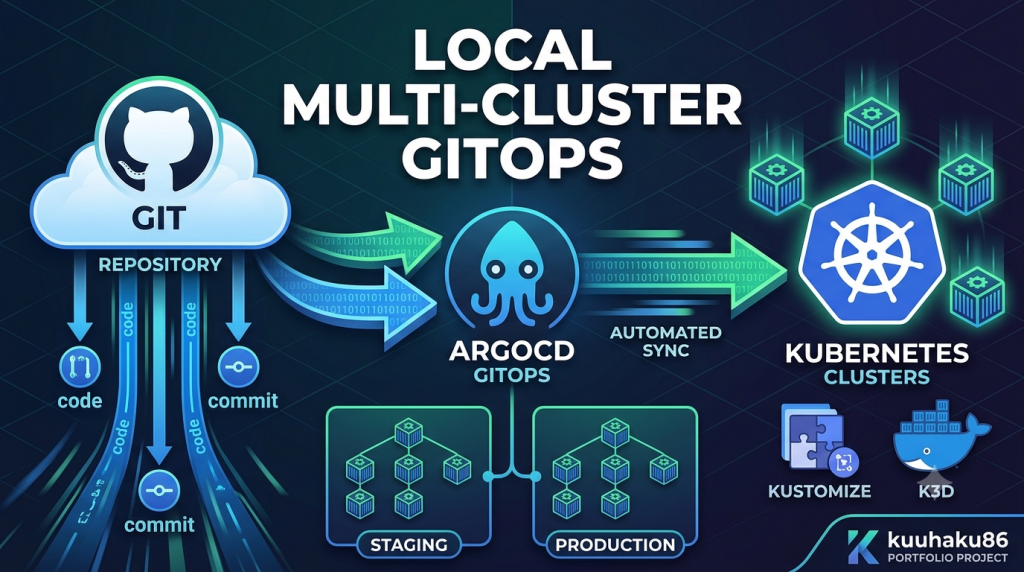
Nowadays, there’s common practice to divide the environment of our application into production and staging. This practice intended to create a safe environment for testing the application before we deploy the application to production and then used by the real user.
So, the engineer need to be able deploy the application into these different environment separately. So, we need to do practice for this purpose. But if we trying to do this on a cloud provider like AWS or GCP, it’s a sure thing that the cost will drain your wallet.
In this post, I will share a cost-effective solution for this problem. We will deploy a enterprise-grade Hub-and-Spoke GitOps environment inside a single local Virtual Machine. And it will completely for free.
This time, we will use Kubernetes as our main orchestrator for the application. We will use k3d to emulate the Kubernetes, ArgoCD as the CD (Continous Deployment) tool and GitHub as our project repository.
The Architectural Design
As I said before, we will using a Hub-and-Spoke model for our deployment now.
– Hub cluster: Acts as the management control plane hosting ArgoCD.
– Spoke clusters (Staging & Prod): Dedicated environments running the isolated applications.
So, we will have around three clusters at our Kubernetes. And the here’s the diagram that illustrate how our deployment will looks like:
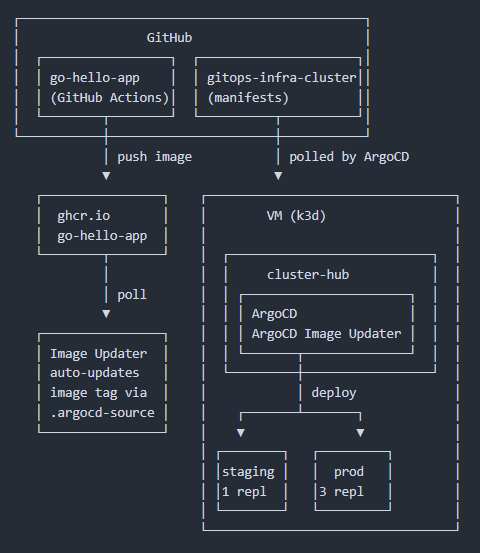
And here’s the flow briefly:
- GitHub Actions in go-hello-app builds and pushes a container image to ghcr.io
- ArgoCD Image Updater polls ghcr.io for new image tags, then auto-updates the tag reference in .argocd-source inside the gitops-infra-cluster kustomizations
- ArgoCD watches gitops-infra-cluster for manifest changes and syncs deployments to the staging and prod targets on the k3d VM
Setting Up the Virtual Playground
Before we can deep dive into the deployment, we need to do some set up on our VM. The step is like this:
- Create the isolated Docker bridge network (
gitops-net), we can use command like:docker network create gitops-net - Use
k3dto rapidly create the clusters that we need. We can use this snippet:k3d cluster create hub --network gitops-net --api-port 6443
k3d cluster create staging --network gitops-net --api-port 6444
k3d cluster create prod --network gitops-net --api-port 6445 - Verify if the environment contexts already correctly setup with
kubectl config get-contexts --no-headers | grep -E "k3d-hub|k3d-staging|k3d-prod"
GitOps Repository Structure: The App-of-Apps Pattern
For the base of this infrastructure, we will use a repository. I have push the project repository to GitHub and you can check it on this link. And here’s how the repository is organized:
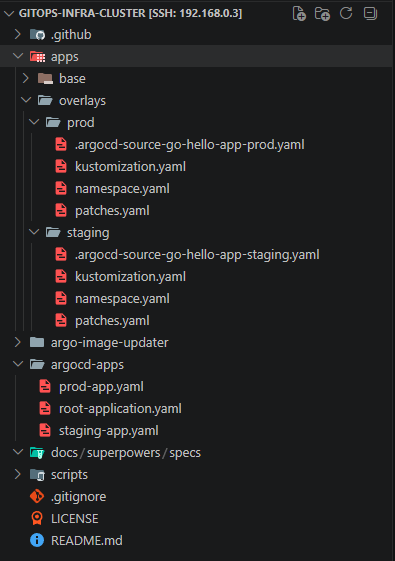
We can see some directory existed on the repository. I will explain some of them briefly.
The Base (apps/base/) is a vanilla Deployment and Service. There’s no environment assumptions, no namespace, no replica tuning existed. Just the core things: container image, port 8080, health probes, and a placeholder APP_ENV=base. kustomization.yaml simply lists the deployment and service as resources.
Kustomize Overlays (apps/overlays/) is two environments that inherit the base. But they have difference and patch the differences like:
| Aspect | Staging | Prod |
|---|---|---|
| Namespace | go-hello-app-staging | go-hello-app-prod |
nameSuffix | -staging | -prod |
| Replicas | 1 | 3 |
APP_ENV | staging | prod |
| CPU request | — | 50m |
| CPU limit | — | 200m |
| Memory request | — | 64Mi |
| Memory limit | — | 128Mi |
Each overlay also contains a .argocd-source-*.yaml . These are write-back target where ArgoCD Image Updater stamps new image tags after polling ghcr.io (Our docker image registry).
The ArgoCD Application Directory (argocd-apps/) have three YAML files implementing the app-of-apps pattern:
- root-application.yaml: Points ArgoCD at argocd-apps/ with directory.recurse: true. Apply this single manifest and ArgoCD auto-discovers everything below.
- staging-app.yaml: Points source.path to apps/overlays/staging, deploys to cluster named staging.
- prod-app.yaml: Points source.path to apps/overlays/prod, deploys to cluster named prod.
The root app deploys child Application CRDs (Custom Resource Definition) into the hub cluster’s argocd namespace, not the workloads. Each child app then runs kustomize build on its overlay and ships the resulting manifests to its target spoke cluster. One commit, one kubectl apply, then two environments synced.
The Biggest Hurdle: Overcoming Local Multi-Cluster Networking
This is most crucial part for the deployment, networking. In a public cloud provider, clusters find each other via open API endpoints. Inside a local Docker network, the ArgoCD Hub cluster cannot see the local spoke endpoints using the standard 127.0.0.1 address loop.
When ArgoCD runs inside a k3d cluster, it needs to reach the spoke clusters’ Kubernetes API servers. The naive approach argocd cluster add k3d-staging that will pulls the IP from your local kubeconfig, which is https://0.0.0.0:6444. That works fine from your laptop but breaks inside Docker: from the hub container’s perspective, 0.0.0.0:6444 is itself, not the staging cluster.
So that is why we are adding the cluster with shared docker bridge network --network gitops-net at our setup. k3d places each cluster’s control-plane container on the same bridge, so they can resolve each other by internal hostname (e.g., k3d-staging-server-0).
Then, when we run argocd cluster add k3d-staging , the ArgoCD CLI will retrieves the kubeconfig from the k3d-staging context. Because k3d writes the Docker-internal address (https://k3d-staging-server-0:6443) into the kubeconfig, ArgoCD on the hub cluster reaches the spoke via the bridge network, not via localhost. No manual hostname overrides needed, k3d does this by default when containers share a network.
The host port mappings (:6444, :6445) exist only for your local kubectl convenience. ArgoCD itself never touches them. This is the single most important design detail that makes local GitOps viable, and the one that trips up almost everyone on their first attempt.
The GitOps Magic in Action
The whole pipeline triggers from a single change to the repo. When Image Updater bumps the image tag in apps/overlays/prod/.argocd-source-go-hello-app-prod.yaml and pushes the commit, ArgoCD’s root application picks it up within its polling interval (default 3 minutes) and cascades the sync down:
- Root app detects the git revision change in
argocd-apps/ - Child apps (
staging-app,prod-app) each run kustomize build on their respective overlay. - Kustomize layers the patched image tag, replica count, and resource limits onto the shared base manifests.
- ArgoCD diffs the rendered manifests against the live cluster state and applies only what changed.
- The
go-hello-app-prodDeployment undergoes a rolling update, new pods with the latest image tag start replacing old ones one at a time, with zero downtime.
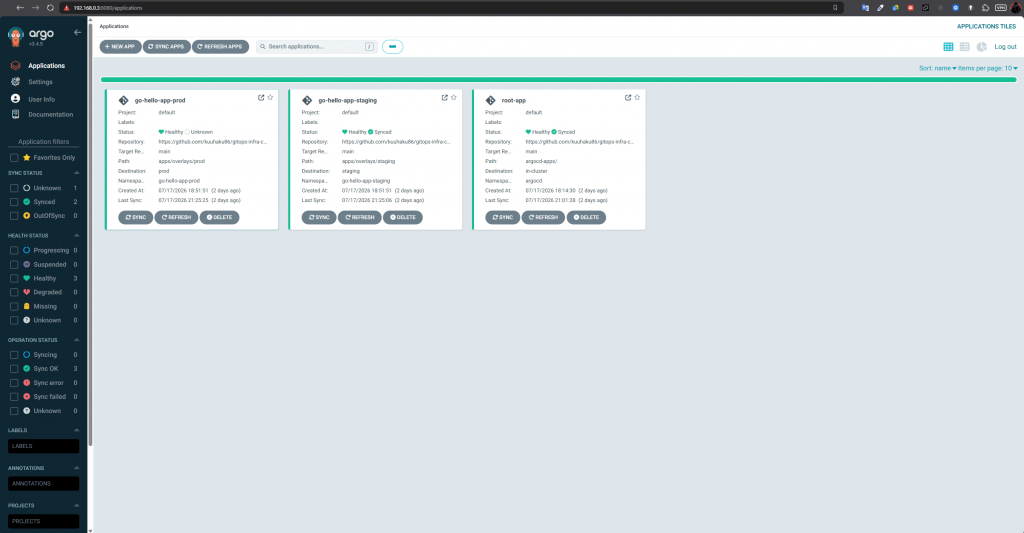
No need for kubectl apply, no manual intervention, no CI pipeline touching the cluster. The dashboard will shows both environments as green “Synced” within seconds of the commit landing on main. The repo is the source of truth and then the clusters just catch up.
Conclusion & Key Takeaways
With this repository, you will get a full hub-and-spoke GitOps pipeline running on a single VM. No cloud bill, no managed services, no abstractions that hide the networking. Every pieces like the Docker bridge, the Kustomize overlays, the ArgoCD app-of-apps wiring will behaves exactly as it would in an enterprise multi-cluster topology. If you can reason about this setup, you can reason about the real thing.
You can try it yourself. Fork the repo, run the bootstrap script, and have two environments syncing from git in under 10 minutes. If you hit a snag or just want to talk GitOps, connect with me.
GitHub: gitops-infra-cluster (https://github.com/kuuhaku86/gitops-infra-cluster)
Portfolio/Blog: https://kuuhaku86.github.io
Leave a Reply